Website Development in 2026–2027. Let’s be honest: keeping up with website development feels like trying to read a book while someone keeps turning the pages. Just when you’ve learned one tool, another one shows up. The good news is that you don’t need to chase everything. Most of what matters for website development 2026 and the years right after it comes down to a handful of simple ideas, and nearly all of them are backed by official guidance from Google, the W3C, Mozilla, OWASP and the European Commission.
So think of this article as a chat over coffee. We’ll walk through ten topics: the big trends, AI, design, frameworks, content management, installable web apps, speed, security, accessibility and budgets. No jargon wall, no hype. Where there’s an official number, I’ll share it. Where there isn’t one, I’ll tell you so instead of making something up.
1. Website Development in 2026–2027/ Why Everything Is Shifting Right Now
Three things are pulling the web forward at the same time.
The first is us, the visitors. Most people browse on their phones, often on shaky connections, and they don’t wait around for slow pages. Google has used the mobile version of a site for indexing and ranking for years now, so a website that struggles on a small screen loses twice: visitors leave, and search visibility suffers.
The second is the browser itself. Things that used to need heavy scripts, like flexible layouts, smooth transitions and modal windows, are now built right into modern browsers. There’s even a helpful initiative called Baseline, documented by MDN and web.dev, that tells developers when a feature is safe to use across the major browsers. That means simpler, lighter websites.
The third is AI. Developers use it to draft code and write tests, and content teams use it for outlines and ideas. The Stack Overflow Developer Survey has shown in recent years that a big share of developers are already using AI tools, but many of them also say they don’t fully trust what those tools produce. I think that mix of excitement and caution is exactly the right attitude.
One more thing: rules matter more than they used to. Accessibility, privacy and security used to be “we’ll deal with it later” items. Now they belong in the plan from day one. Keep that in mind as we go.

AI and Web Development
Cutting-edge web development powered by artificial intelligence. Smart automation, AI-driven content, chatbots, and intelligent features to enhance user experience and boost conversion rates.
- • AI-Powered Automation
- • Smart Chatbots & Assistants
- • AI Content Generation
- • Data-Driven Optimization
2. Website Development in 2026–2027/ Web Development Trends 2026 You Can Actually Use
Let’s look at the web development trends 2026 and 2027 are bringing, sticking to directions that browser makers, standards bodies and developer surveys actually support.
The first trend is doing more with less code. Modern CSS can handle layouts, animations and responsive behavior that once needed JavaScript libraries. Less code sent to the browser usually means a faster page, and everyone likes a faster page.
The second is rendering on the server first. Many modern frameworks build pages on the server or ahead of time, then add interactivity only where it’s needed. Pages show up sooner, and search engines can read them easily.
The third is TypeScript, which has become a default choice for many teams. It catches mistakes early and keeps bigger projects tidy.
Then there are the themes we’ll dig into later: AI-assisted workflows, accessibility from the start, and performance treated as a real business metric. Here’s the quick overview:
| Trend | What it means in practice |
|---|---|
| Platform-first CSS and HTML | Built-in browser features replace heavy scripts |
| Server-first rendering | Faster first load and easier indexing |
| TypeScript adoption | Fewer bugs in larger projects |
| AI-assisted development | Faster drafts, but a human still reviews |
| Accessibility and privacy by design | Compliance built in from the start |
| Performance as a business metric | Core Web Vitals guide your priorities |
You don’t have to adopt all of this at once. Pick the one that fixes your biggest headache and start there.
3. Website Development in 2026–2027/ AI Website Development: Helpful, but Not Magic
AI website development is the topic everybody asks about, so let’s keep it real.
What AI is good at today: suggesting code, turning a rough idea into a first layout, writing tests, explaining confusing error messages, summarizing long documentation and brainstorming page structures. A developer can describe a contact form in plain words and get a starting point in seconds. A site owner can explore ideas before ever talking to an agency. That’s a real time-saver for repetitive work.
What it’s not good at: being right every time. AI-generated code can look perfect and still hide a bug, an outdated pattern or a security gap. So the sensible rule is simple. Let AI suggest, then let a human review, test and decide. Code reviews, automated tests and security checks matter just as much as before.
The same goes for content. Google’s Search Central guidance says that using AI or automation isn’t against its rules by itself. The problem is content created mainly to game search rankings, which is treated as spam. What does well is helpful, original, people-first content that shows real experience. So if AI helps you write, add your own facts, examples and voice, and double-check every claim.
A few habits that keep things safe:
- Never paste passwords, API keys or customer data into a public AI tool.
- Check every dependency an AI suggests before you install it.
- After AI-assisted changes, test speed and accessibility, not just whether the feature works.
- Keep track of which parts were AI-assisted so you know where to look first if something breaks.
My favorite way to think about it: AI is a fast, tireless junior colleague. Very helpful, sometimes wrong, always worth a second look.
4. Website Development in 2026–2027/ Web Design Trends 2026: Calm, Fast and Welcoming
Now for the fun part. The web design trends 2026 and 2027 are less about flashy effects and more about making a site feel easy to use.
Clarity wins. Clean layouts, generous spacing, readable type and obvious buttons never go out of style. If a visitor can find what they need in a few seconds, you’ve done your job.
Responsive design is getting smarter. With container queries, a component can adapt to the space it sits in, not only to the width of the whole screen. That makes reusable pieces much easier to build and keeps things neat on phones, tablets and big monitors.
Motion should have a purpose. A menu that slides in, a button that confirms a tap, a smooth move between pages: great. Animation that just shows off: skip it. Browsers are adding native tools for page transitions, so smooth effects no longer need heavy libraries. And please respect the “prefers-reduced-motion” setting, so people who are sensitive to movement can switch animations off.
Dark mode is now a normal expectation. Many visitors set their devices to dark, so supporting both themes with good contrast is a smart move. Speaking of contrast, the WCAG guidelines set minimum contrast ratios for text, and following them helps everyone, including anyone reading on a phone in bright sunlight.
Personalization is useful when it’s honest. Showing relevant content helps visitors, as long as they understand what’s happening with their data. We’ll come back to that in the privacy section.
If an effect makes your page slower or more confusing, it probably isn’t worth it.
5. Website Development in 2026–2027/ Best Web Development Frameworks for 2026–2027
Choosing among the best web development frameworks can feel like standing in front of a giant menu, so let’s make it easier. Developer surveys such as Stack Overflow’s and the State of JavaScript have consistently shown React as one of the most widely used web libraries, with Vue, Angular, Svelte and newer tools like Astro also well represented.
Here’s a simple overview:
| Framework | Built on | Often chosen for |
|---|---|---|
| Next.js | React | Full-stack sites, server rendering, huge ecosystem |
| Nuxt | Vue | Approachable full-stack projects |
| Angular | TypeScript | Large enterprise applications |
| SvelteKit | Svelte | Lightweight, quick interfaces |
| Astro | Several UI libraries | Content sites that ship very little JavaScript |
A few rules of thumb. If your site is mostly articles, a blog or marketing pages, a content-focused tool like Astro or a well-set-up CMS may be all you need. If you’re building a complex app with accounts and dashboards, a full-stack framework makes more sense. And if your team already knows a tool well, that familiarity often beats a “better” tool nobody has used before.
Also, you don’t always need a framework. A small site built with plain HTML, CSS and a little JavaScript can be fast, secure and pleasantly easy to maintain.
6. Website Development in 2026–2027/ Headless CMS and Composable Architecture
Let’s talk about how content gets managed behind the scenes.
A traditional CMS, like classic WordPress, keeps the editing area and the public website together in one system. A headless CMS splits them apart. Editors write content in a back office, and that content travels through an API to wherever it’s needed: a website, a mobile app, even a digital screen.
People pick this setup for a few reasons. Developers get freedom to use any modern front end. The same content can be reused across several channels. And since the public site can be built ahead of time and served from a content delivery network, pages can load very quickly.
Closely related is composable architecture, which means building a site from specialized services: one for content, one for search, one for payments, one for sign-in, all connected through APIs. You can swap any piece later without rebuilding the whole thing.
The catch is that more services mean more connections to manage, more places to secure and more things to monitor. For a small business site, a well-maintained traditional CMS is often simpler, cheaper and perfectly fine. And if you like WordPress, it can even run in headless mode.
Three questions can help you decide. Do we need to publish the same content in several places? Does our team have the skills to look after a set of connected services? Will we actually use the extra flexibility? If you’re answering “no”, keep it simple. If it’s “yes”, headless can serve you really well in 2026–2027.
7. Website Development in 2026–2027/ Progressive Web Apps and Mobile-First Delivery
Progressive web apps, or PWAs, are websites that act a bit like installed apps. According to MDN and web.dev, a PWA relies on ordinary web technology: a web app manifest that describes the app’s name, icons and colors, and a service worker, a background script that can cache files so parts of the site keep working offline or on a weak connection. PWAs also require HTTPS, which protects your visitors’ data.
For visitors, that means they can add your site to their home screen, open it in its own window and, in some cases, get notifications, all without visiting an app store. For owners, it’s a budget-friendly way to offer an app-like experience without building separate iPhone and Android apps.
PWAs suit stores, booking tools, news sites, dashboards and internal business tools. They’re less ideal when you need deep access to device features that browsers can’t provide yet, although that list keeps shrinking. Support also differs between browsers and operating systems, so check the current compatibility tables on MDN before you commit.
Even if you never build a full PWA, the mobile-first mindset is gold. Design for small screens first. Use responsive images so phones don’t download giant files. Make tap targets big enough for fingers. Keep forms short. Test on real devices and slower networks, not only on a speedy office computer.
At its heart, mobile-first is just empathy. Picture someone on a train platform with one bar of signal, and make sure your site still helps them.
8. Core Web Vitals and Speed Optimization
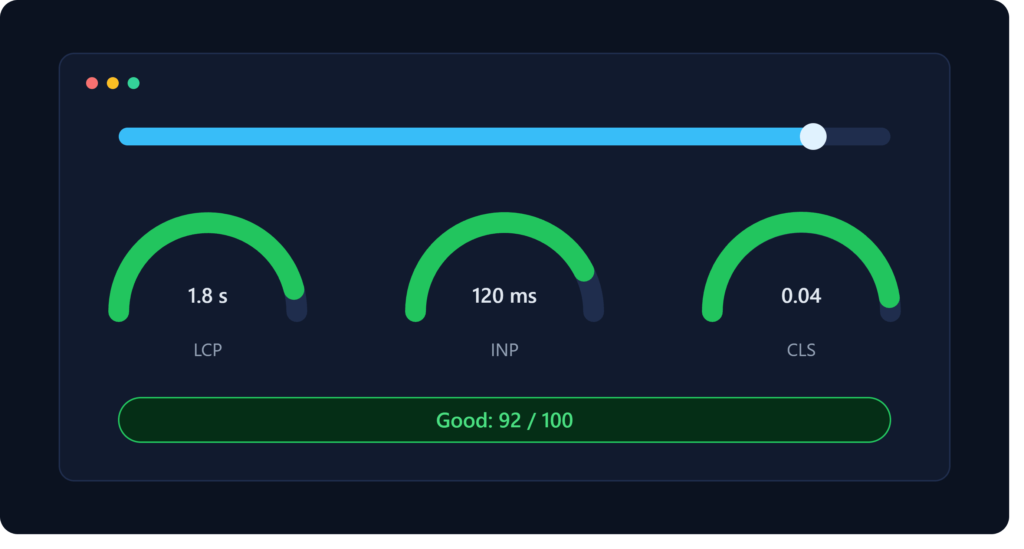
Speed helps everyone: your visitors, search engines and your own goals. Google’s Core Web Vitals give us three clear ways to measure real user experience, documented on web.dev and in Google Search Central.
Largest Contentful Paint, or LCP, measures loading: how soon the main content appears. Interaction to Next Paint, or INP, measures responsiveness: how quickly the page reacts when someone taps or clicks. It replaced First Input Delay as a Core Web Vital in March 2024. Cumulative Layout Shift, or CLS, measures visual stability: whether things jump around while the page loads.
Google evaluates these at the 75th percentile of page loads, which simply means that three out of four visits should hit the “good” level.
| Metric | Good | Needs improvement | Poor |
|---|---|---|---|
| LCP | 2.5 s or less | 2.5 to 4 s | Over 4 s |
| INP | 200 ms or less | 200 to 500 ms | Over 500 ms |
| CLS | 0.1 or less | 0.1 to 0.25 | Over 0.25 |
How do you improve them? Compress images and size them properly, and use modern formats like WebP or AVIF. Load only the JavaScript each page needs. Reserve space for images, ads and embeds so the layout doesn’t jump. Use caching and a content delivery network. Pick reliable hosting. And go easy on heavy third-party scripts.
To check your own site, try Google’s free tools: PageSpeed Insights, Lighthouse and the Core Web Vitals report in Search Console. They show both lab tests and real-user data. Fix the biggest problem first, measure again and repeat. Small, steady wins add up faster than you’d think.
9. Website Security Best Practices and Accessibility Compliance
Security and accessibility might seem like separate worlds, but they share one goal: a site that’s safe and usable for everyone.
Let’s start with website security best practices. The OWASP Foundation publishes the OWASP Top 10, a respected list of the most critical web application security risks, covering things like broken access control and injection attacks. You don’t need to memorize it. The habits behind it are what count:
- Use HTTPS everywhere.
- Keep your CMS, plugins, themes and libraries up to date.
- Use strong, unique passwords and turn on two-factor authentication for admin accounts.
- Give each user only the permissions they truly need.
- Validate and clean all input from forms and URLs.
- Back up your site regularly, and test that you can actually restore it.
- Add security headers, such as a Content Security Policy.
- Remove plugins and accounts you no longer use.
Privacy fits in here too. If you serve visitors in the European Union, the GDPR and ePrivacy rules affect how you handle personal data and cookies. Collect only what you need, explain it plainly and ask for consent where it’s required.
Now accessibility. The W3C published WCAG 2.2 as an official recommendation in October 2023. It rests on four principles: content should be perceivable, operable, understandable and robust. In everyday terms, that means text descriptions for images, enough color contrast, full keyboard navigation, clear form labels and error messages, and consistent navigation.
The legal side is growing too. The European Accessibility Act, Directive (EU) 2019/882, began applying on 28 June 2025 to a range of products and services, including e-commerce. Other regions have their own rules, so if you work internationally, check what applies to you or ask a qualified legal adviser.
The nice part is that secure, accessible sites are usually better sites overall: easier to use, easier to maintain and friendlier to search engines.
10. Website Development Cost, Low-Code Builders and Final Thoughts
Now the question everyone’s been waiting for: how much will it cost? The honest answer is that there’s no official price list for websites, so any single number would be a guess. What I can do is show you what drives the budget, so you can read quotes with confidence.
| Cost factor | Why it matters |
|---|---|
| Project scope | More pages and features mean more work |
| Design level | Template versus fully custom design |
| Technology choice | Website builder, CMS or custom code |
| Integrations | Payments, bookings, CRM and similar services |
| Content creation | Writing, photos, video and translation |
| Compliance and testing | Accessibility, privacy and security checks |
| Ongoing maintenance | Hosting, updates, backups and support |
This is where low-code website builders and no-code tools come in. They offer visual editors, ready-made templates and built-in hosting, so a small business or personal project can go live fast on a modest budget. The trade-offs are less control over performance and code, some limits on customization and dependence on the platform’s pricing and rules. They’re great for simple brochure sites, portfolios and small shops. For complex products, custom features or strict performance and accessibility needs, a developer-built solution usually pays off.
For planning, ask for itemized quotes, decide your must-have features first, launch a focused first version and improve it over time. And remember the yearly costs: hosting, domain, maintenance and fresh content, not only the initial build.
So, what’s the takeaway? Website development in 2026–2027 comes down to a few sensible habits. Build for phones first. Keep pages fast. Write and design for real people. Use AI as a helper, not an autopilot. Protect your visitors’ data. Make your site work for everyone. You don’t have to follow every trend. Pick the improvements that match your goals, test them with real users and measure the results with trusted tools from Google, the W3C, OWASP and MDN.
Ready for a first step? Run a quick audit of your current site. Check its Core Web Vitals, try navigating it with just a keyboard, review your security basics and read it on your phone. Those few minutes will show you exactly where to begin. Happy building!

BestChina3DPrinters.com
Your trusted guide to Chinese 3D printers. Expert reviews, comparisons, and recommendations for FDM and resin printers from top brands like Creality, Anycubic, Flashforge, and more.
- • Expert Reviews & Guides
- • Price Comparisons
- • Discount Codes & Deals
- • Beginner-Friendly Tips