
If you’ve ever clicked on a website and immediately hit the back button because it was taking forever to load — you already understand the problem. Website speed isn’t just a technical detail for developers to worry about. It’s one of the most important factors shaping your Google rankings, your user experience, and ultimately, your revenue. In 2026, slow websites are simply not an option.
In this guide, we’ll walk through everything you need to know about website speed optimization — from Core Web Vitals and Google ranking factors to how a faster site can directly increase your sales. Let’s dive in.
Why Website Speed Matters in 2026 SEO
The internet has never been faster — and users have never been less patient. According to Google research, as page load time increases from 1 second to 3 seconds, the probability of a visitor bouncing increases by 32%. Push that to 5 seconds and the bounce probability jumps by 90%.
But it’s not just user behavior. Google has officially made website speed optimization a confirmed ranking signal. Since the Page Experience Update rolled out and Core Web Vitals became a ranking factor, technical SEO performance is now directly tied to where your website appears in search results.
In 2026, Google’s algorithm is more sophisticated than ever. It rewards websites that deliver a fast, stable, and responsive experience. If your competitors have a fast loading website and yours is sluggish, they are very likely outranking you — even if your content is better.
Speed also matters because of how people search today. Over 60% of all Google searches now happen on mobile devices. Mobile users are often on slower connections and have even less patience for delays. Combine that with Google’s mobile-first indexing, and you have a clear message: speed is not optional.
Beyond rankings, website speed optimization is foundational to every other digital marketing effort you make. Fast-running paid ads, strong social media content, excellent email campaigns — all of it leads back to your website. If it’s slow, everything else suffers.
What Are Core Web Vitals?
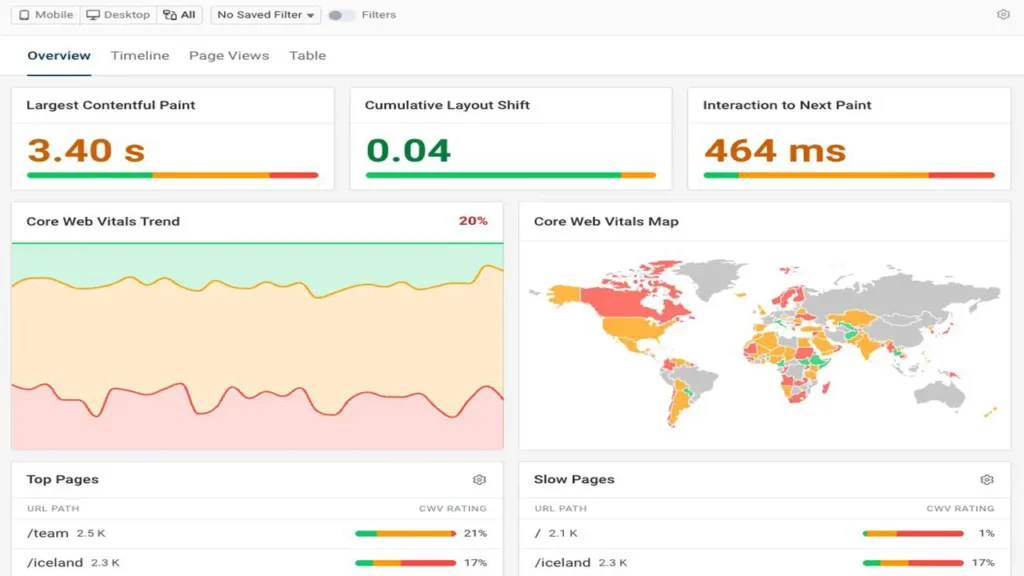
Core Web Vitals are a set of specific, real-world performance metrics defined by Google to measure the quality of user experience on a web page. They were introduced as part of Google’s broader Page Experience signals and became an official Google ranking factor in 2021, with continuous refinements since.
As of 2026, Core Web Vitals consist of three primary metrics:
1. Largest Contentful Paint (LCP) LCP measures loading performance — specifically, how long it takes for the largest visible element on the page (usually an image or a block of text) to fully render. Google considers a good LCP to be 2.5 seconds or less.
2. Interaction to Next Paint (INP) INP replaced First Input Delay (FID) as the interactivity metric in March 2024. It measures the overall responsiveness of a page to user interactions — clicks, taps, and keyboard presses. A good INP score is 200 milliseconds or less.
3. Cumulative Layout Shift (CLS) CLS measures visual stability — how much the page layout unexpectedly shifts while loading. A page that jumps around as images and ads load is frustrating and creates a poor experience. A good CLS score is 0.1 or less.
These three metrics form the technical SEO performance backbone of Google’s Page Experience evaluation. Passing Core Web Vitals doesn’t guarantee a top ranking, but failing them puts you at a clear disadvantage, especially in competitive niches.
| Metric | What It Measures | Good Score | Needs Improvement | Poor Score |
|---|---|---|---|---|
| LCP | Loading speed of largest element | ≤ 2.5s | 2.5s – 4.0s | > 4.0s |
| INP | Page interactivity & responsiveness | ≤ 200ms | 200ms – 500ms | > 500ms |
| CLS | Visual stability / layout shifts | ≤ 0.1 | 0.1 – 0.25 | > 0.25 |
Source: Google Web Developers Documentation (web.dev/vitals)
How Website Loading Speed Impacts Rankings
The relationship between page speed SEO and Google rankings is well-documented and direct. Google has been clear: speed is a ranking signal for both desktop and mobile searches.
But it goes deeper than just “faster = higher rankings.” Google uses real-world data collected from Chrome users through the Chrome User Experience Report (CrUX) to evaluate your website’s speed. This means your rankings are partly based on the actual experience your real visitors are having — not just what a testing tool shows in ideal conditions.
Here’s how website loading speed connects to rankings in practice:
Crawl Budget: Google’s crawlers have a limited amount of time and resources to spend on each website. If your pages load slowly, Google may crawl fewer of them, meaning some of your content may not get indexed at all. A fast loading website helps Google crawl and index more pages, which can significantly impact your visibility for long-tail keywords.
Dwell Time: When users land on a fast website, they tend to stay longer, explore more pages, and engage more with the content. These behavioral signals — time on site, pages per session, return visits — are factors that indirectly reinforce your rankings.
Page Experience Score: Google’s Search Console now provides a Page Experience report that directly shows you how your site scores on Core Web Vitals, mobile usability, and HTTPS. Pages that pass Core Web Vitals may receive a small ranking boost as part of the overall page experience evaluation.
A study from Backlinko analyzing 11.8 million Google search results found a strong correlation between page speed and first-page rankings. While content remains the dominant ranking factor, speed acts as a tie-breaker and a threshold — cross below it, and you’re penalized regardless of content quality.

AndreevWebStudio.com
Professional web development and design services. Custom WordPress sites, landing pages, e-commerce solutions, and 3D printing content creation for businesses and creators.
- • WordPress Development
- • Custom Web Design
- • E-Commerce Solutions
- • 3D Printing Content
Mobile Speed & Google’s Mobile-First Indexing
Since 2019, Google has operated on a mobile-first indexing model. This means Google predominantly uses the mobile version of your website for indexing and ranking — even for desktop search results. If your mobile site is slow, poorly structured, or missing content, your overall SEO suffers.
Mobile page speed is particularly critical because:
- Network conditions vary widely. Mobile users may be on 4G, 5G, or even 3G networks. Your site needs to load fast even under less-than-ideal conditions.
- Mobile hardware is less powerful. JavaScript-heavy sites that run fine on a desktop processor can crawl on a mid-range smartphone.
- User expectations are higher. Research from Google and Deloitte found that improving mobile site speed by just 0.1 seconds increased conversion rates by up to 8% for retail sites.
Google’s recommended approach for mobile performance includes:
- Using responsive design that adapts to all screen sizes
- Enabling browser caching and compression (Gzip/Brotli)
- Minimizing JavaScript and CSS blocking rendering
- Serving images in next-generation formats like WebP or AVIF
- Implementing lazy loading for images below the fold
If your website is not passing Core Web Vitals on mobile specifically, that is a significant SEO liability in 2026. The good news is that fixing mobile speed issues benefits both your rankings and your user experience simultaneously.
UX Signals That Influence SEO
Website speed and user experience are deeply intertwined. Google uses a range of UX-related signals to evaluate page quality, and many of them are directly affected by how fast (or slow) your website loads.
Bounce Rate: When a page loads slowly, users leave before engaging. A high bounce rate signals to Google that your page may not be providing a good experience for that search query, which can negatively influence rankings over time. Reducing bounce rate starts with reducing load time.
Pages Per Session: Fast websites encourage exploration. Users who have a smooth, responsive experience are more likely to click through to other pages, browse product categories, or read related articles. This increases pages per session — a positive engagement signal.
Return Visits: Users who have a good experience come back. Repeat visitors are a quality signal that Google incorporates into its evaluation of website authority and trustworthiness.
Click-Through Rate (CTR): While not directly a speed metric, websites that consistently deliver fast, high-quality experiences build brand trust over time. Users recognize and prefer sites they’ve had good experiences with, leading to higher CTR from search results.
Improving user experience through speed optimization creates a positive feedback loop: faster site → lower bounce rate → more engagement → better UX signals → higher rankings → more traffic → more conversions.
Slow Websites Kill Conversions
Let’s talk numbers. Conversion rate optimization and website speed are inseparably linked. The data from industry leaders is consistent and striking:
- Amazon calculated that every 100ms of additional latency costs them 1% in sales.
- Walmart found that for every 1-second improvement in page load time, conversions increased by 2%.
- A Google and Deloitte joint study found that a 0.1-second speed improvement on mobile led to an 8.4% increase in conversions for retail and 10.1% for travel sites.
These aren’t small, niche findings — they’re from some of the most-trafficked sites in the world, with millions of data points behind them.
Why does speed kill conversions when it’s slow? Because every second of delay introduces friction. Friction creates doubt. Doubt leads to abandonment. The user starts asking themselves: “Is this site even working? Should I just go back and try a different result?”
For lead generation websites, slow speeds mean fewer form fills. For e-commerce sites, they mean abandoned carts. For service businesses, they mean lost inquiries. In every case, a slow website is a direct drag on revenue.
| Load Time | Bounce Rate Increase | Conversion Impact |
|---|---|---|
| 1 second | Baseline | Optimal |
| 3 seconds | +32% | Significant drop |
| 5 seconds | +90% | Severe impact |
| 10 seconds | +123% | Critical loss |
Source: Google/SOASTA Research, Think with Google
How Speed Affects E-Commerce Sales
For e-commerce businesses, website speed optimization isn’t a nice-to-have — it’s a direct revenue driver. The entire customer journey, from product discovery to checkout completion, is affected by how fast your website performs.
Product Pages: Shoppers browsing product pages expect images to load instantly and descriptions to appear without delay. A slow product page causes users to lose interest before they even add an item to their cart.
Shopping Cart & Checkout: This is the most critical part of the funnel. Cart abandonment rates average around 70% across e-commerce globally (Baymard Institute, 2024). A significant portion of that abandonment is tied to performance issues — slow page transitions, unresponsive buttons, and delayed payment processing.
Search and Filtering: E-commerce sites with large product catalogs rely heavily on internal search and filtering functionality. If these features are slow or laggy, users default to leaving the site entirely and searching on Google or Amazon instead.
Seasonal Traffic Spikes: During Black Friday, holiday seasons, or product launches, traffic can spike dramatically. A website that performs adequately under normal load can collapse under high traffic — losing exactly the customers who were most ready to buy.
The investment in a fast, well-optimized e-commerce site pays dividends every single day. According to Portent research, a site that loads in 1 second has a 3x higher conversion rate than a site that loads in 5 seconds.
Common Technical Issues Slowing Down Websites
Understanding what causes poor website loading speed is the first step to fixing it. Here are the most common technical culprits that drag down performance:
1. Unoptimized Images Images are typically the largest files on any web page. Uploading a 4MB JPEG when a 150KB WebP would look identical is one of the most common — and most fixable — speed problems.
2. Render-Blocking JavaScript and CSS Scripts and stylesheets that load before the page content can render cause significant delays. Deferring or asynchronously loading non-critical JavaScript is a standard optimization technique.
3. No Browser Caching Without proper cache headers, returning visitors have to re-download every file on every visit. Setting appropriate cache expiration times for static assets (images, scripts, fonts) dramatically improves load times for repeat visitors.
4. Slow Server Response Time (TTFB) Time to First Byte (TTFB) is the time it takes for the server to respond to a browser request. Poor hosting, overloaded servers, or unoptimized databases can all inflate TTFB. Google recommends a TTFB below 800ms.
5. No Content Delivery Network (CDN) A CDN distributes your website’s static files across servers worldwide. Without one, users far from your server experience higher latency. Using a CDN can reduce load times by 50% or more for international visitors.
6. Excessive Third-Party Scripts Analytics tools, chat widgets, ad pixels, social sharing buttons — each one adds an HTTP request and slows your site. Auditing and removing unnecessary third-party scripts is often one of the quickest wins in technical SEO performance.
7. Too Many HTTP Requests Every element on your page — images, scripts, stylesheets, fonts — requires a separate HTTP request. Combining files, using CSS sprites, and reducing page elements all help reduce the total number of requests.
8. Not Using Gzip or Brotli Compression Server-side compression reduces the size of HTML, CSS, and JavaScript files before they’re sent to the browser. Enabling Brotli (preferred) or Gzip compression is a simple server configuration change that can reduce file sizes by 70–80%.
Best Tools to Test Website Speed in 2026
You can’t improve what you don’t measure. Here are the most reliable and widely-used tools for testing and monitoring website speed:
Google PageSpeed Insights (pagespeed.web.dev) The most authoritative tool for Core Web Vitals measurement. It pulls real-world data from the Chrome User Experience Report (CrUX) alongside lab data. Free and directly reflects how Google evaluates your site.
Google Search Console — Core Web Vitals Report Provides aggregated real-user data for your entire website, organized by URL group. Essential for identifying which pages have the most critical speed issues at scale.
GTmetrix (gtmetrix.com) A popular tool that combines Google Lighthouse scores with its own waterfall analysis. Excellent for identifying exactly which files are causing delays and in what order they load.
WebPageTest (webpagetest.org) An advanced open-source tool that allows testing from multiple locations, on real devices, and across different network conditions. Preferred by developers for deep-dive performance analysis.
Lighthouse (Chrome DevTools) Built directly into Google Chrome, Lighthouse can be run locally on any page — including pages behind login walls. It generates detailed scores for Performance, Accessibility, SEO, and Best Practices.
Cloudflare Web Analytics For sites using Cloudflare, the built-in analytics provide real-world performance monitoring without impacting your own site speed (unlike some JavaScript-based analytics).
| Tool | Best For | Data Type | Cost |
|---|---|---|---|
| PageSpeed Insights | Core Web Vitals check | Real + Lab | Free |
| Google Search Console | Site-wide CWV monitoring | Real-user | Free |
| GTmetrix | Waterfall analysis | Lab | Free / Pro |
| WebPageTest | Advanced dev testing | Lab | Free |
| Lighthouse (Chrome) | Local & private pages | Lab | Free |
Why Businesses Should Invest in Professional SEO Optimization
By now it’s clear: website speed optimization isn’t a one-time checkbox. It’s an ongoing process that sits at the intersection of technical SEO, user experience, and business performance. And while tools are freely available, actually implementing meaningful improvements requires expertise, time, and a deep understanding of how all the pieces fit together.
Here’s why professional investment pays off:
The Technical Depth Is Significant Properly optimizing Core Web Vitals, server configuration, image delivery pipelines, JavaScript execution, and caching strategies requires specialized knowledge. Attempting it without experience often leads to breaking things or making superficial changes that don’t move the needle.
Every Industry Is Competitive If your competitors are investing in technical SEO performance and you’re not, the gap widens every month. In industries like e-commerce, legal, medical, and financial services, a difference of a few positions in Google can mean tens of thousands of dollars in monthly revenue.
Speed Optimization Has Compounding Returns Unlike paid ads that stop generating traffic the moment you stop spending, speed improvements continue to deliver results. A faster website ranks better, converts better, and costs less to maintain over time.
It’s Holistic, Not Isolated Real website speed optimization touches your hosting infrastructure, your CMS configuration, your image pipeline, your third-party scripts, your code quality, and your CDN setup. A professional team sees the whole picture and prioritizes the highest-impact changes first.
Google’s Standards Keep Evolving Google updates its Page Experience criteria and Core Web Vitals thresholds. Staying on top of those changes — and adapting your website accordingly — requires ongoing attention that most business owners simply don’t have time for.
Whether you’re running a small business website, a growing e-commerce store, or a large enterprise platform, the message is the same: speed is one of the most powerful levers you have for improving both your SEO rankings and your sales.
The investment in a properly optimized, fast loading website isn’t a cost — it’s one of the highest-ROI decisions you can make in your digital marketing strategy.
If you’re ready to take your website performance seriously, the team at Andreev Web Studio specializes in professional website speed optimization, technical SEO, and Core Web Vitals improvement. They combine technical expertise with a results-driven approach to help businesses rank higher, convert better, and grow faster.
Visit andreevwebstudio.com to learn more and get a free website performance audit.
🇬🇧 English
This article clearly explains how website speed impacts SEO and sales. Very practical insights and easy to apply. The site itself is fast and professional. Highly recommended for business owners.
👉 Visit: www.andreevwebstudio.com
🇪🇸 Español
El artículo explica perfectamente cómo la velocidad del sitio afecta el SEO y las ventas. Información clara, útil y bien estructurada. El sitio es rápido y profesional.
👉 Visita: www.andreevwebstudio.com
🇸🇦 العربية
المقال يوضح بشكل ممتاز كيف تؤثر سرعة الموقع على تحسين محركات البحث والمبيعات. المحتوى مفيد وسهل الفهم، والموقع احترافي وسريع.
👉 زر الموقع: www.andreevwebstudio.com
🇨🇳 中文
这篇文章清楚地解释了网站速度如何影响SEO和销售。内容实用、结构清晰,网站本身也非常专业且加载快速。
👉 访问: www.andreevwebstudio.com
🇫🇷 Français
L’article explique très bien l’impact de la سرعة du site sur le SEO et les ventes. Contenu clair, utile et professionnel. Le site est rapide et bien conçu.
👉 Visitez: www.andreevwebstudio.com
🇩🇪 Deutsch
Der Artikel zeigt klar, wie die Ladegeschwindigkeit einer Website SEO und Verkäufe beeinflusst. Sehr informativ und praxisnah. Die Website ist schnell und professionell.
👉 Besuchen Sie: www.andreevwebstudio.com

BestChinaGadget.com
Your trusted source for Chinese tech gadgets and electronics. Expert reviews, comparisons, and deals on smart devices, accessories, and innovative products from China’s leading brands.
- • Gadget Reviews & Guides
- • Price Comparisons
- • Exclusive Deals & Discounts
- • Tech News & Trends