
Introduction: Why Your Platform Choice Matters More Than Ever
When it comes to building an online store in 2026, the decision you make about your ecommerce platform is one of the most important choices you’ll face as a business owner. The WooCommerce vs Shopify debate has been going on for years, and both platforms have grown significantly — adding new features, improving performance, and expanding their ecosystems.
But here’s the thing: there is no single “best” platform for everyone. The right choice depends on your business goals, technical comfort level, budget, and long-term growth plans. Whether you’re launching your first store or migrating an established business, understanding the real differences between these two giants will save you time, money, and headaches.
In this guide, we’ll break down everything you need to know — pricing, SEO capabilities, customization, scalability, and more — so you can make a confident, informed decision.
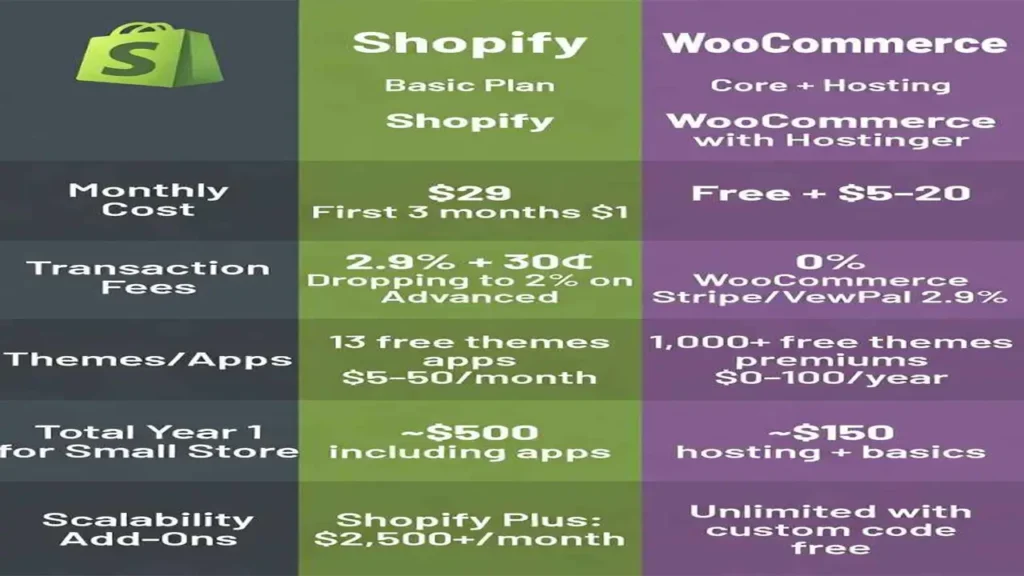
WooCommerce vs Shopify Overview
Before diving into the details, let’s start with a quick look at what each platform actually is.
WooCommerce is a free, open-source ecommerce plugin built for WordPress. It powers a massive portion of online stores worldwide and gives merchants full control over their website, data, and design. Because it runs on WordPress, it inherits one of the most powerful content management systems in the world.
Shopify is a fully hosted, all-in-one ecommerce platform. You sign up, choose a plan, pick a theme, and start selling — without worrying about hosting, security updates, or server maintenance. It’s designed for speed and simplicity.
Here’s a high-level overview:
| Feature | WooCommerce | Shopify |
|---|---|---|
| Type | Open-source plugin (WordPress) | Hosted SaaS platform |
| Ownership | Full ownership of data & code | Platform-dependent |
| Hosting | Self-hosted (you choose) | Fully managed by Shopify |
| Pricing Model | Free core + variable costs | Monthly subscription |
| Ease of Use | Moderate learning curve | Beginner-friendly |
| Customization | Virtually unlimited | Good within platform limits |
| SEO Control | Advanced (with plugins) | Good built-in tools |
Pricing Comparison: WooCommerce Pricing vs Shopify Pricing
Money matters. Let’s talk about what you’ll actually spend on each platform.
WooCommerce Pricing
WooCommerce itself is free to download and install. However, running a real store involves several costs:
- Hosting: Depending on the provider and plan, expect to pay anywhere from $5 to $30 per month for shared hosting, and significantly more for managed WordPress hosting or VPS solutions.
- Domain name: Typically $10–$20 per year.
- SSL certificate: Many hosts include this free, but premium SSL options exist.
- Premium themes: Most quality WooCommerce themes range from $30 to $100 as a one-time purchase, though some use annual licensing.
- Plugins and extensions: The WooCommerce Extensions Store offers both free and paid plugins. Paid extensions can range from $49 to $299 per year depending on functionality.
- Developer costs: If you need custom development work, this is an additional variable cost.
For a basic store, WooCommerce can be launched for as little as $10–$30 per month. For a fully featured, well-optimized store, the real monthly cost often lands between $50 and $200 depending on your hosting tier and plugin stack.
Shopify Pricing
Shopify uses a clear, tiered monthly subscription model:
- Basic Shopify: $39/month
- Shopify: $105/month
- Advanced Shopify: $399/month
- Shopify Plus (enterprise): Starting at $2,300/month
On top of the subscription, keep in mind:
- Transaction fees: If you don’t use Shopify Payments, transaction fees range from 0.5% to 2% per sale depending on your plan.
- Apps: Many advanced features require paid apps from the Shopify App Store, which add to your monthly spend.
- Premium themes: Shopify themes range from free to around $350 as a one-time purchase.
Which Is Cheaper in the Long Run?
At entry level, WooCommerce can be less expensive. But as your store grows and you add more plugins, higher-tier hosting, and professional support, costs converge. Shopify’s pricing is more predictable, which many business owners prefer for budgeting purposes. WooCommerce gives you more control over where your money goes, while Shopify bundles convenience into a fixed monthly cost.
SEO Capabilities: WooCommerce SEO vs Shopify SEO
Search engine optimization is one of the biggest factors in long-term ecommerce success. Let’s compare both platforms honestly.
WooCommerce SEO
WooCommerce is built on WordPress — widely considered the gold standard for SEO-friendly content management. Here’s why WooCommerce wins on SEO flexibility:
- URL structure: WordPress gives you full control over your URL structure. You can create clean, keyword-rich URLs for every product, category, and blog post.
- Schema markup: With plugins like Rank Math, you can add structured data (product schema, review schema, breadcrumb schema) without touching a single line of code.
- Meta tags: Rank Math and similar plugins let you customize meta titles and descriptions for every page, post, and product individually.
- Blogging: WordPress is the world’s leading blogging platform. Creating content-rich blog posts that support your store’s SEO strategy is seamless and natural.
- Technical SEO: You have full access to your site’s server configuration, robots.txt, .htaccess file, sitemap settings, and page speed optimizations.
- Rank Math compatibility: Rank Math is one of the most powerful SEO plugins available, and it integrates directly into WooCommerce, offering WooCommerce-specific SEO features like product page optimization, rich snippets, and keyword tracking.
Shopify SEO
Shopify has made significant improvements to its SEO capabilities in recent years:
- URL structure: Shopify does impose some limitations. Product URLs, for example, always include /products/ in the path and cannot be changed. Collection URLs include /collections/. This is a minor but real limitation for advanced SEO practitioners.
- Meta tags: You can edit meta titles and descriptions for every page, product, and collection.
- Blogging: Shopify includes a built-in blog, but it’s more limited than WordPress in terms of content organization, categories, and editorial workflow.
- Schema: Shopify themes include some schema markup by default, but customization is more restricted compared to WooCommerce.
- Technical SEO: Since Shopify is a hosted platform, you have less access to server-level settings. Some technical SEO tasks require workarounds or apps.
- Sitemap: Shopify automatically generates a sitemap.xml, which is helpful for beginners.
SEO Verdict
For businesses where content marketing and long-term organic traffic are central to the strategy, WooCommerce on WordPress has a clear edge. The combination of WordPress’s publishing power and Rank Math’s advanced optimization tools creates an SEO environment that Shopify simply cannot match out of the box. Shopify is solid for basic SEO and works well for stores that rely more on paid advertising than organic search.
Customization and Flexibility: WordPress Ecommerce and Ecommerce Website Design
One of WooCommerce’s greatest strengths is how deeply you can customize your store.
WooCommerce Customization
- Themes: Thousands of WooCommerce-compatible themes are available from marketplaces like ThemeForest, Elegant Themes, and the official WordPress theme directory. You can also build fully custom themes from scratch.
- Page builders: Tools like Elementor and Divi allow non-developers to create stunning ecommerce website designs without writing code.
- Plugins: The WordPress plugin ecosystem includes over 59,000 plugins covering everything from advanced product filtering to subscription management, membership systems, multi-vendor marketplaces, and more.
- Custom development: Since WooCommerce is open source, developers can modify any aspect of the codebase, add custom post types, build unique checkout flows, or create entirely bespoke functionality.
- Headless commerce: WooCommerce supports headless architecture via its REST API and GraphQL integration, allowing developers to decouple the front end from the back end for maximum performance.
Shopify Customization
- Themes: Shopify’s Theme Store offers a curated selection of professionally designed themes. The number is smaller than WordPress’s ecosystem but every theme is reviewed for quality.
- Shopify App Store: With over 8,000 apps available, you can extend Shopify’s functionality significantly — though some features that are free in WooCommerce cost money in the Shopify App Store.
- Liquid templating: Shopify uses its own templating language called Liquid. Developers familiar with Liquid can make substantial customizations, but it’s a more restricted environment than WordPress’s PHP-based system.
- Headless commerce: Shopify also supports headless commerce through its Storefront API and Hydrogen framework (built on React), which is a growing area for high-performance stores.
Customization Verdict
If you have a unique business model, unusual product types, or need a very specific user experience, WooCommerce is the more flexible choice. Shopify is excellent for standard store setups and covers most use cases well, but you may occasionally hit walls when trying to implement highly custom functionality.
BestChina3DPrinters.com
Your trusted guide to Chinese 3D printers. Expert reviews, comparisons, and recommendations for FDM and resin printers from top brands like Creality, Anycubic, Flashforge, and more.
- • Expert Reviews & Guides
- • Price Comparisons
- • Discount Codes & Deals
- • Beginner-Friendly Tips
Scalability for Growing Businesses: Online Store Platform and Ecommerce Website Development
WooCommerce Scalability
WooCommerce can scale to handle large catalogs, high traffic volumes, and complex operations — but scaling it requires effort and investment:
- Hosting upgrades: As your store grows, you’ll need to upgrade your hosting plan. Managed WordPress hosts like Kinsta or WP Engine are built for high-performance WooCommerce stores.
- Large catalogs: WooCommerce handles large product catalogs well when paired with proper database optimization and caching.
- International selling: With plugins like WPML or Polylang, you can build fully multilingual stores with localized currencies and checkout experiences.
- Performance: Caching plugins (like WP Rocket), a CDN, and image optimization are necessary for maintaining fast load times as your store scales.
- Enterprise readiness: Large enterprises use WooCommerce successfully, but it requires a skilled development team or agency to manage infrastructure and performance.
Shopify Scalability
Shopify is designed to scale with minimal effort from the merchant:
- Managed infrastructure: Shopify handles all server management, load balancing, and uptime — even during peak shopping periods like Black Friday.
- Shopify Plus: For high-volume merchants, Shopify Plus offers dedicated support, customizable checkout, automation tools, and advanced API access.
- International selling: Shopify Markets allows merchants to sell in multiple countries with localized languages, currencies, and domain structures built in.
- Performance: Shopify’s global CDN ensures fast load times worldwide by default.
Scalability Verdict
For businesses that want to grow without managing technical infrastructure, Shopify scales more gracefully. WooCommerce can match Shopify’s performance and scale but requires more proactive management. For enterprise-level stores with dedicated development teams, WooCommerce offers more architectural freedom.
Ease of Use and Support
WooCommerce
WooCommerce has a moderate learning curve. If you’re already comfortable with WordPress, the transition is smooth. If you’re brand new to both, expect to spend some time learning the ecosystem. The good news is that the WordPress community is enormous — there are tutorials, YouTube channels, forums, and documentation covering virtually every question you might have.
Support for WooCommerce itself is available through the official WooCommerce support team and the WordPress.org forums. For premium plugins and themes, support is typically provided by the individual developers.
Shopify
Shopify is genuinely beginner-friendly. The onboarding process is guided, the dashboard is clean and intuitive, and you can have a basic store live within hours. Shopify offers 24/7 customer support via live chat, email, and phone — which is a significant advantage for merchants who aren’t technically inclined.
Shopify also has an extensive help center, video tutorials, and a large community forum. For Shopify Plus merchants, dedicated account managers are available.
Ease of Use Verdict
Shopify wins for beginners and time-pressed entrepreneurs. WooCommerce rewards those who invest time to learn it, offering greater long-term returns in terms of flexibility and control.
Which Platform Fits Different Business Types?
Let’s get practical. Here’s a straightforward guide to help you identify which platform suits your situation.
| Business Type | Recommended Platform | Reason |
|---|---|---|
| Small business / local store | Either (Shopify for ease) | Shopify is faster to launch; WooCommerce gives more SEO control |
| Startup with limited budget | WooCommerce | Lower upfront and monthly costs; more control over spend |
| Blogger turning store owner | WooCommerce | Already on WordPress; seamless integration of blog + shop |
| Large ecommerce store | Shopify Plus or WooCommerce | Shopify Plus for managed scale; WooCommerce for custom needs |
| B2B / wholesale business | WooCommerce | Greater flexibility for custom pricing, user roles, and catalogs |
| Dropshipping store | Shopify | Deep integrations with DSers, Oberlo successors, and suppliers |
| Content-driven store (SEO focus) | WooCommerce | WordPress + Rank Math = unmatched SEO environment |
| International / multi-language | Either | Shopify Markets vs WPML/Polylang — both work well |
Final Comparison Table
| Category | WooCommerce | Shopify |
|---|---|---|
| Cost | Variable; lower entry, flexible scaling | Predictable monthly plans from $39/mo |
| SEO | Advanced (Rank Math, full URL control) | Good built-in; some URL limitations |
| Speed | Depends on hosting & optimization | Fast globally via built-in CDN |
| Security | Your responsibility (plugins + host) | Fully managed by Shopify (PCI compliant) |
| Scalability | High (requires technical management) | High (managed automatically) |
| Customization | Virtually unlimited (open source) | Good within platform boundaries |
| Maintenance | Manual updates required | Fully managed by Shopify |
| Support | Community + third-party support | 24/7 official support |
Conclusion: WooCommerce vs Shopify — Who Should Choose What?
After comparing WooCommerce and Shopify across every major category, here’s the straightforward summary:
Choose WooCommerce if:
- You want maximum control over your store, data, and design
- SEO and content marketing are central to your growth strategy
- You’re already using WordPress or plan to run a content-rich website alongside your store
- You have access to a developer or are comfortable managing a self-hosted environment
- You need highly custom functionality that standard platforms can’t provide
- You’re running a B2B, subscription, or multi-vendor operation
Choose Shopify if:
- You want to launch quickly with minimal technical setup
- You prefer predictable monthly costs and managed hosting
- Your business relies more on paid advertising and social commerce than organic SEO
- You’re running a straightforward product catalog, dropshipping business, or DTC brand
- 24/7 official support is important to your peace of mind
- You plan to scale internationally and want a managed solution that grows with you
Both platforms are proven, mature, and capable of supporting serious ecommerce businesses. The decision ultimately comes down to your priorities: control and flexibility with WooCommerce, or simplicity and managed convenience with Shopify.
Frequently Asked Questions
Is WooCommerce better than Shopify for SEO?
WooCommerce generally offers greater SEO flexibility because it is built on WordPress and supports advanced optimization tools such as Rank Math. You get full control over URL structures, schema markup, meta tags, and technical SEO settings. Shopify provides solid built-in SEO tools but imposes some limitations, particularly around URL structure and server-level access.
Which platform is cheaper?
WooCommerce has lower entry costs but requires you to budget separately for hosting, plugins, and maintenance. Shopify has predictable monthly pricing starting at $39 per month but adds transaction fees if you don’t use Shopify Payments, along with potential costs for premium apps. For small stores, WooCommerce can be more affordable. For growing stores where time is money, Shopify’s bundled convenience often justifies the subscription.
Which platform is easier for beginners?
Shopify is considerably easier to launch because hosting, security, and updates are all managed automatically. You can go from signup to a live store in a matter of hours. WooCommerce requires more setup but rewards you with greater long-term control. If you’re willing to invest a bit of learning time upfront, WooCommerce pays dividends over the life of your store.
Can I migrate from Shopify to WooCommerce?
Yes. Products, customers, orders, and SEO redirects can all be migrated with proper planning to minimize ranking losses. The process involves exporting data from Shopify, importing it into WooCommerce, and setting up 301 redirects for any URL changes. Working with an experienced developer or agency ensures a smooth transition that protects your SEO rankings and customer data.
Looking for a high-performance ecommerce website? Whether you need a custom WooCommerce store, a Shopify migration, professional SEO optimization, or ongoing website maintenance, the experts at andreevwebstudio.com can help you build an online store that grows with your business. Explore the services available and request a free consultation today.
🇺🇸 English – ⭐⭐⭐⭐⭐
An excellent comparison of WooCommerce and Shopify! The article clearly explains pricing, SEO, customization, and scalability, making it easy to choose the right platform for any business. The website is professional, informative, and full of practical advice. I highly recommend reading the full guide at www.andreevwebstudio.com if you’re planning to launch or improve your online store.
🇪🇸 Español – ⭐⭐⭐⭐⭐
¡Un artículo excelente sobre WooCommerce y Shopify! La comparación es clara, completa y muy útil para cualquier persona que quiera crear una tienda online. Me gustó especialmente la explicación sobre SEO y los costos. Recomiendo visitar www.andreevwebstudio.com para leer la guía completa y descubrir más consejos profesionales.
🇸🇦 العربية – ⭐⭐⭐⭐⭐
مقال رائع يشرح الفروق بين WooCommerce وShopify بطريقة سهلة وواضحة. تمت مقارنة الأسعار وتحسين محركات البحث وإمكانيات التوسع بشكل احترافي. إذا كنت تخطط لإنشاء متجر إلكتروني، أنصحك بزيارة www.andreevwebstudio.com لقراءة المقال الكامل والاستفادة من الخبرة المتخصصة.
🇨🇳 中文 – ⭐⭐⭐⭐⭐
这是一篇非常专业的 WooCommerce 与 Shopify 对比文章!内容详细介绍了价格、SEO、可扩展性和自定义功能,帮助我更容易选择适合自己的电商平台。强烈推荐访问 www.andreevwebstudio.com 阅读完整文章,获取更多实用的网站建设和SEO建议。
🇫🇷 Français – ⭐⭐⭐⭐⭐
Excellent article comparant WooCommerce et Shopify ! Les explications sur le référencement, les coûts et les possibilités de personnalisation sont très claires. Le site est professionnel et propose des conseils de grande qualité. Je recommande vivement de visiter www.andreevwebstudio.com pour lire l’article complet.
🇩🇪 Deutsch – ⭐⭐⭐⭐⭐
Ein hervorragender Vergleich zwischen WooCommerce und Shopify! Der Artikel erklärt verständlich die Kosten, SEO-Vorteile, Skalierbarkeit und Anpassungsmöglichkeiten. Die Informationen sind praxisnah und sehr hilfreich. Besuchen Sie unbedingt www.andreevwebstudio.com, um den vollständigen Beitrag zu lesen und weitere professionelle Tipps rund um E-Commerce und Webentwicklung zu erhalten.