1. What Is SEO and Why Does Your Business Need It?
On page vs technical seo. If you’ve ever typed something into Google and clicked one of the top results, you’ve experienced SEO in action. Search Engine Optimization is the practice of improving your website so that search engines like Google can find it, understand it, and rank it higher than your competitors. For businesses, this translates directly into more visibility, more website visitors, and ultimately more customers — without paying for every click like you do with ads.
According to Google’s own Search documentation, search engines work by crawling the web, indexing content, and then serving the most relevant results to users based on hundreds of ranking signals. If your site isn’t optimized, you’re essentially invisible to people searching for exactly what you offer.
Before you can improve your SEO, however, it helps to understand that SEO isn’t one single thing. It actually breaks down into two major categories — and knowing the difference between them is the first step toward a smarter strategy. Think of it this way: if your website were a restaurant, On-Page SEO would be the quality of your menu and food, while Technical SEO would be whether your restaurant has proper plumbing, electricity, and signage. You need both to succeed.
An SEO audit of your website is often the best starting point. It helps you see exactly where you stand in both areas and what needs the most attention. Tools like Google Search Console (free) and various third-party platforms can give you a clear snapshot of your current performance.
2. What Is On-Page SEO, Explained in Simple Terms?
On-Page SEO refers to everything you do directly on your web pages to make them more relevant and useful to both users and search engines. The key word here is “on” — these are all the elements you can see and control right on the page itself.
Think about the last article you read online. The headline grabbed your attention, the content answered your question, the images helped illustrate the points, and maybe there were links to related topics. All of those elements are part of On-Page SEO.
According to Google’s Search Essentials (formerly Webmaster Guidelines), the most important thing you can do is create helpful, reliable, people-first content. Google’s systems are designed to reward pages that genuinely serve the reader — not pages stuffed with keywords or written for robots.
On-Page SEO optimization is something every website owner can start doing immediately, regardless of technical skill. It’s about asking: “Does this page clearly answer what someone is searching for?” If the answer is yes, you’re already on the right track.
3. What Does On-Page SEO Include?
On-Page SEO is made up of several interconnected components that work together to signal relevance to search engines. Here’s a breakdown of the main elements:
Content Quality and Relevance This is the foundation of SEO content optimization. Your content needs to match what your target audience is actually searching for — this is called “search intent.” Google’s Quality Raters Guidelines define high-quality content as having Expertise, Authoritativeness, and Trustworthiness (E-E-A-T). Content that thoroughly covers a topic, answers follow-up questions, and is written by credible authors tends to rank higher.
Keyword Placement While keyword stuffing is long gone as a strategy, thoughtful keyword use still matters. Your primary keyword should appear naturally in the title, the first paragraph, a few subheadings, and throughout the body text at a density of roughly 1–1.5%. Forcing it in unnaturally actually hurts readability — and Google notices.
Headings (H1, H2, H3) Heading tags help both readers and search engines understand the structure of your content. Each page should have one H1 (the main title) and use H2s and H3s to organize sections logically. This improves readability and helps Google extract key topics from your page.
Image Optimization Images should have descriptive file names and alt text — brief descriptions that tell search engines (and screen readers) what the image shows. Oversized images that slow down your page are a common On-Page issue with Technical SEO consequences too.
URL Structure Clean, readable URLs like /on-page-vs-technical-seo perform better than messy strings of numbers and symbols. They’re easier for users to read and remember, and they give search engines a quick clue about the page topic.
| On-Page Element | What It Does | Difficulty |
|---|---|---|
| Page Title (H1) | Tells users and Google the main topic | Easy |
| Meta Description | Preview text in search results; boosts click-through | Easy |
| Body Content | Answers the search query in depth | Medium |
| Keyword Placement | Signals relevance to search engines | Easy |
| Image Alt Text | Describes images for accessibility and SEO | Easy |
| Internal Links | Connects related pages; distributes authority | Easy |
| URL Slug | Readable web address that signals topic | Easy |
4. What Is Technical SEO?
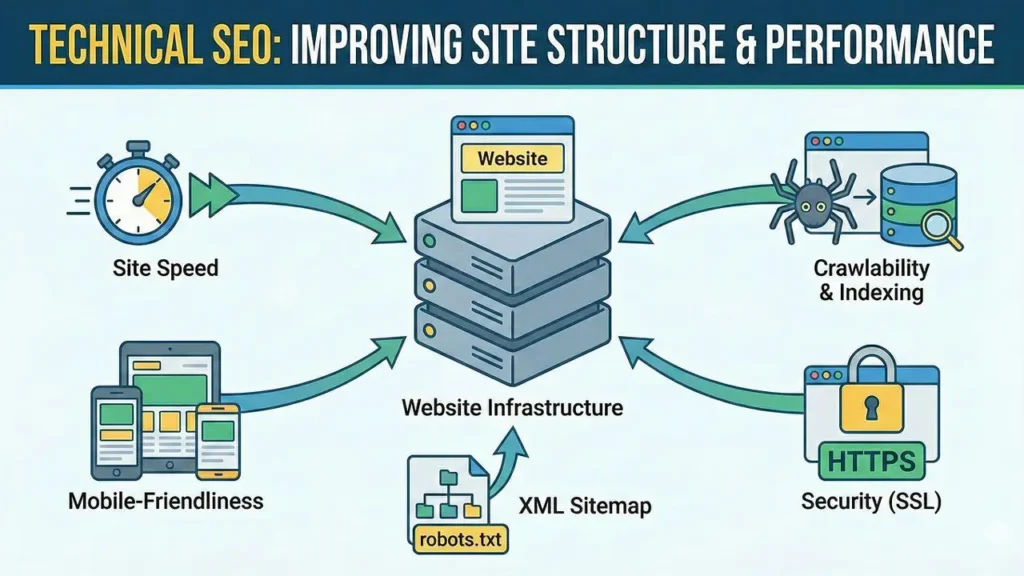
If On-Page SEO is about what your website says, Technical SEO is about how it works. Technical SEO covers all the behind-the-scenes infrastructure that allows search engines to crawl, render, and index your website efficiently — and that gives users a fast, reliable experience.
The term might sound intimidating, but you don’t have to be a developer to understand what technical SEO does. Imagine trying to read a book where the pages are stuck together, the chapters are out of order, and half the text is printed too small to read. That’s what a poorly optimized website looks like to Google’s crawlers.
According to Google’s official documentation on how Search works, Googlebot (Google’s web crawler) visits pages, follows links, and tries to understand the content. If your site has technical errors — broken links, pages blocked from crawling, duplicate content, or slow load times — Google may not be able to index your pages properly, no matter how great your content is.
Technical SEO is especially critical for larger websites with hundreds or thousands of pages. The more complex your site, the more important it becomes to ensure everything is properly structured and accessible.

AndreevWebStudio.com
Professional web development and design services. Custom WordPress sites, landing pages, e-commerce solutions, and 3D printing content creation for businesses and creators.
- • WordPress Development
- • Custom Web Design
- • E-Commerce Solutions
- • 3D Printing Content
5. The Core Elements of Technical SEO
A solid Technical SEO checklist covers a wide range of factors. Here are the most important ones that every website owner should be aware of:
Crawlability Search engines need to be able to crawl (visit and read) your pages. Your robots.txt file tells search engine bots which pages they’re allowed to visit. Accidentally blocking important pages is one of the most common and damaging technical SEO mistakes.
XML Sitemap An XML sitemap is essentially a map of your website that you submit to Google via Search Console. It lists all the pages you want Google to know about, making the crawling process faster and more thorough.
HTTPS Security Google confirmed HTTPS as a ranking signal back in 2014, and it remains important today. Sites with SSL certificates (https://) are considered more secure and are given a slight preference over http:// sites.
Core Web Vitals Since 2021, Google has used Core Web Vitals as part of its ranking algorithm. These are three specific measurements of page experience: Largest Contentful Paint (LCP) for loading speed, Interaction to Next Paint (INP) for responsiveness, and Cumulative Layout Shift (CLS) for visual stability. Google’s PageSpeed Insights tool measures all three for free.
Canonicalization If you have multiple URLs that show similar or identical content, you need canonical tags to tell Google which version is the “official” one. Without them, you risk duplicate content issues that dilute your rankings.
Structured Data (Schema Markup) Structured data is code you add to your pages that helps Google understand the content better. It can lead to “rich results” in search — like star ratings, FAQs, or recipe cards — which can dramatically improve click-through rates.
| Technical Element | Purpose | Google Tool to Check |
|---|---|---|
| robots.txt | Controls crawler access to pages | Search Console – URL Inspection |
| XML Sitemap | Guides Google through your site structure | Search Console – Sitemaps |
| HTTPS / SSL | Secures connection; minor ranking signal | Chrome browser padlock |
| Core Web Vitals | Measures real-world page experience | PageSpeed Insights |
| Canonical Tags | Prevents duplicate content issues | Search Console – Coverage |
| Structured Data | Enables rich results in search | Rich Results Test |
| 404 Error Pages | Broken links hurt crawl budget | Search Console – Coverage |
6. Website Speed: Why It’s a Direct Ranking Factor
Let’s talk about page speed — because it sits at the intersection of technical SEO and user experience, and it has a measurable impact on your rankings and your conversions.
Google has been clear that page speed is a ranking factor for both desktop and mobile searches. According to research published on Google’s developer documentation (web.dev), as page load time increases from 1 second to 3 seconds, the probability of a mobile user bouncing (leaving without interacting) increases by 32%. At 5 seconds, that bounce probability jumps to 90%.
Website speed optimization involves several technical actions:
Image Compression — Large image files are the single most common cause of slow pages. Converting images to modern formats like WebP can reduce file size by 25–34% compared to JPEG, according to Google’s own developer guidance.
Browser Caching — When a browser “caches” (saves) your site’s assets locally, returning visitors see your pages load much faster because their browser doesn’t have to re-download everything.
Minifying CSS, JavaScript, and HTML — Removing unnecessary spaces, comments, and characters from code files reduces their size and speeds up parsing.
Content Delivery Networks (CDNs) — A CDN stores copies of your website on servers around the world, so users are served from a location close to them geographically, reducing load time.
Server Response Time — Your hosting quality matters. A slow server means a slow website, regardless of how well-optimized your code is. Google recommends a server response time (Time to First Byte) of under 600ms.
The Largest Contentful Paint (LCP) Core Web Vital specifically measures how long it takes for the largest visible element on the page (usually a hero image or main heading) to load. Google’s threshold for a “Good” LCP score is under 2.5 seconds.
7. Mobile-Friendly Design and User Experience
Here’s a fact that should immediately tell you where to prioritize: as of 2024, Google operates on a mobile-first indexing basis for all websites. That means Google primarily uses the mobile version of your content for indexing and ranking — even for desktop searches.
If your website delivers a poor experience on smartphones, it will rank lower across the board. Period.
A mobile friendly website for SEO means more than just a layout that “fits” on a small screen. According to Google’s mobile usability documentation, the key factors include:
- Text that’s readable without zooming (minimum 16px font size recommended)
- Touch targets (buttons, links) that are large enough to tap accurately (minimum 48×48 pixels per Google’s guidelines)
- Content that doesn’t require horizontal scrolling
- No intrusive interstitials (pop-ups) that block the main content on mobile
Beyond the purely technical requirements, User Experience (UX) signals also influence rankings indirectly. When users find a page easy to navigate, spend more time reading it, and interact with it positively, those behavioral signals tell Google the page is valuable. High bounce rates, short session durations, and quick returns to search results are all signals that something about the experience isn’t working — whether that’s content quality, design, speed, or a combination.
Responsive web design — where a single website layout adapts fluidly to any screen size — is Google’s recommended approach, as stated in their developer documentation.
8. Website Indexing and Site Structure
Even if your website is beautifully designed and packed with great content, none of it matters if Google can’t find it and index it. Website indexing by Google is the process of adding your pages to Google’s database so they can appear in search results.
Several technical factors affect how well your site gets indexed:
Crawl Budget Large websites don’t get crawled infinitely. Google allocates a “crawl budget” to each site — essentially, a limit on how many pages Googlebot will visit in a given period. If you have thousands of low-value pages (thin content, redirects, duplicate pages), Google may spend its crawl budget on those instead of your important pages. Keeping your site clean and well-organized helps ensure Google crawls what matters.
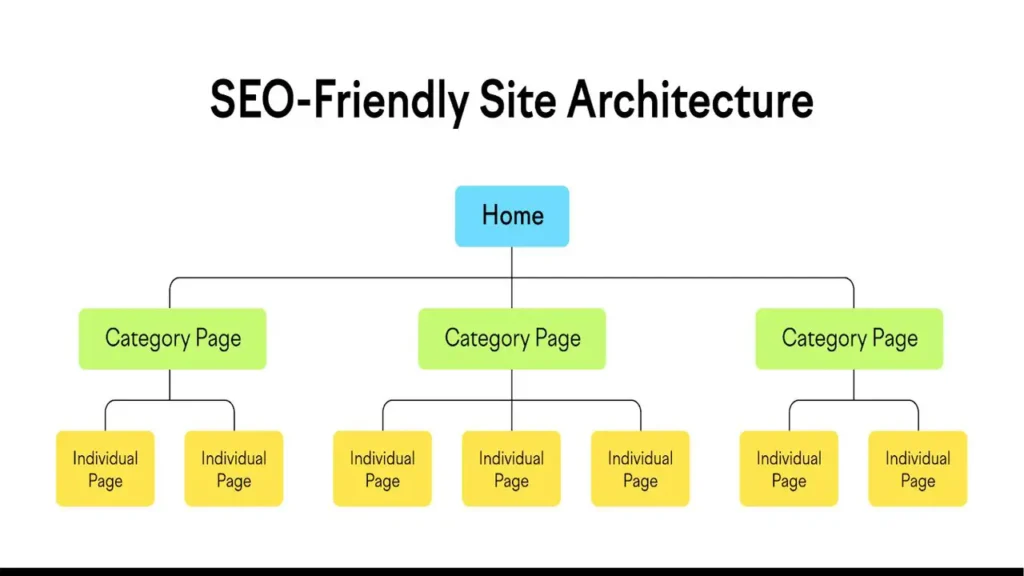
URL Structure and Site Architecture A logical site hierarchy matters both for users and crawlers. The general recommendation is that no important page should be more than 3 clicks away from your homepage. Flat site architectures (where pages are close to the root) tend to get crawled more efficiently than deeply nested structures.
Redirect Chains When URLs change, redirects are necessary. But chains of multiple redirects (A redirects to B which redirects to C) slow down crawlers and dilute link authority. Keeping redirect chains to a single hop is a technical SEO best practice.
Index Coverage Report Google Search Console provides an Index Coverage report that shows exactly which of your pages are indexed, which are excluded, and why. Regularly checking this report is one of the most practical things any site owner can do to stay on top of technical issues.
| Status in Search Console | What It Means | Action Required |
|---|---|---|
| Indexed – Appearing in Search | Page is live and ranking | Monitor performance |
| Crawled – Not Indexed | Google visited but chose not to index | Review content quality |
| Discovered – Not Indexed | Google knows it exists but hasn’t crawled it | Improve internal linking / crawl budget |
| Excluded by robots.txt | Googlebot is blocked from accessing the page | Check robots.txt for errors |
| 404 / Not Found | Page is broken or deleted | Fix or redirect the URL |
9. Internal Linking and Meta Tags: Two Underrated Powerhouses
Two elements often get overlooked in SEO discussions because they’re neither flashy nor complex — but they consistently deliver results: internal linking and meta tags.
Internal Linking for SEO
Internal links are hyperlinks that connect one page on your website to another page on the same website. Their SEO value works on multiple levels.
First, they help search engines discover content. When Googlebot lands on your homepage and follows internal links, it eventually reaches deeper pages it might not have found otherwise. Second, internal links distribute “link equity” (sometimes called PageRank) throughout your site. A well-linked internal page can rank better than an isolated page with identical content.
Third — and this is often underappreciated — the anchor text you use for internal links gives Google context about the target page. Linking to an article about SEO audits with the anchor text “learn how to run an SEO audit” tells Google exactly what that page is about.
Best practices for internal linking, as outlined in Google’s documentation:
- Use descriptive anchor text (not “click here” or “read more”)
- Link to your most important pages from multiple places across your site
- Aim for 2–5 internal links per article, pointing to genuinely relevant content
- Avoid orphan pages — pages with no internal links pointing to them
SEO Meta Tags Optimization
Meta tags are snippets of HTML code in your page’s header that describe the page to search engines and browsers. The two most important ones for SEO are:
The Title Tag — This is the clickable headline that appears in Google search results. It should be unique for every page, include your primary keyword naturally, and stay within roughly 50–60 characters to avoid truncation in search results. According to Google’s documentation, well-crafted title tags help Google understand what the page is about and influence click-through rates.
The Meta Description — This is the short paragraph of descriptive text that appears below the title in search results. While Google has stated that meta descriptions are not a direct ranking factor, they significantly influence whether users click on your result. A compelling meta description acts like a mini advertisement for your page. Keep it under 155–160 characters and make it genuinely useful to the reader.
Other notable meta tags include the robots meta tag (which can instruct search engines not to index a page or not to follow its links) and Open Graph tags (which control how your content appears when shared on social media).
10. On-Page vs Technical SEO: Which One Matters More?
Here’s the honest answer: you need both. But understanding when to prioritize each one can make a real difference for your strategy and your budget.
Think of Technical SEO as the prerequisite. If search engines can’t crawl your site, can’t index your pages, or can’t serve them quickly on mobile, then your On-Page SEO efforts are wasted. There’s no point in writing the world’s best blog post if it takes 10 seconds to load, isn’t mobile-friendly, and is accidentally blocked from being indexed. Technical SEO is the foundation that makes everything else possible.
On-Page SEO, on the other hand, is what actually earns you rankings once that foundation is solid. Two technically identical websites will have very different rankings based on the quality, relevance, and depth of their content, their use of keywords, their internal linking structure, and how well they satisfy user intent.
For most small and medium-sized businesses, especially those with newer or simpler websites, the practical priority order looks like this:
First, fix any critical technical issues — make sure your site is indexed, HTTPS, mobile-friendly, and loads at a reasonable speed. Google Search Console flags most of these for free. Second, focus on creating high-quality content that genuinely serves your audience. Third, continuously optimize your on-page elements (titles, meta descriptions, headings, internal links) and monitor your Core Web Vitals as your site grows.
For enterprise websites with thousands of pages, technical SEO often becomes the dominant ongoing concern — managing crawl budgets, redirects, duplicate content at scale, and site architecture across vast content libraries.
The bottom line, according to the principles outlined across Google’s own documentation — from Search Essentials to the Core Web Vitals initiative — is that the best-ranking websites do both well. They’re fast, crawlable, and mobile-friendly (Technical SEO), AND they publish content that genuinely helps people and is clearly organized and well-described (On-Page SEO).
| Factor | On-Page SEO | Technical SEO |
|---|---|---|
| Main focus | Content relevance and quality | Site infrastructure and performance |
| Who handles it | Content writers, marketers | Developers, SEO specialists |
| Time to see results | Weeks to months | Days to weeks (after fixes) |
| Key tools | Google Search Console, Rank Math | PageSpeed Insights, Search Console |
| Without the other | Great content that can’t be found | Fast site with nothing worth ranking |
| Priority for new sites | High – content drives growth | High – must be set up correctly first |
| Priority for large sites | Ongoing – freshness matters | Very high – scale creates complexity |
The best way to approach this in 2026 isn’t to choose one over the other — it’s to run a proper SEO audit of your website, understand which area has the most gaps right now, and address those systematically. Strong Technical SEO gets you in the game. Strong On-Page SEO wins the game. Together, they’re what separate the sites ranking on page one from the ones stuck on page five.
🇺🇸 John Miller — ⭐⭐⭐⭐⭐
Great experience working with this team! The article about on-page vs technical SEO was clear, practical, and actually helped me understand what my website was missing. After applying the tips, I already see improvements.
👉 www.andreevwebstudio.com
🇪🇸 Carlos Rodríguez — ⭐⭐⭐⭐⭐
Muy buen servicio y contenido de alta calidad. El artículo explica SEO de manera sencilla y útil para negocios reales. Además, el sitio web es rápido y profesional. Sin duda volveré a trabajar con ellos.
👉 www.andreevwebstudio.com
🇸🇦 Ahmed Al-Farsi — ⭐⭐⭐⭐⭐
خدمة ممتازة ومحتوى احترافي جداً. المقال ساعدني على فهم تحسين محركات البحث بشكل أفضل. الموقع سريع وسهل الاستخدام. أوصي به بشدة.
👉 www.andreevwebstudio.com
🇨🇳 Li Wei — ⭐⭐⭐⭐⭐
非常专业的服务!文章内容清晰易懂,让我真正理解了SEO的核心。网站速度很快,体验很好。强烈推荐。
👉 www.andreevwebstudio.com
🇫🇷 Pierre Dubois — ⭐⭐⭐⭐⭐
Service de très haute qualité. L’article est clair, utile et facile à comprendre même sans connaissances techniques. Le site est rapide et bien optimisé. Je recommande vivement.
👉 www.andreevwebstudio.com
🇩🇪 Markus Schneider — ⭐⭐⭐⭐⭐
Sehr zufrieden mit dem Service! Der Artikel hat mir geholfen, die Unterschiede im SEO besser zu verstehen. Die Website ist schnell und modern. Klare Empfehlung.
👉 www.andreevwebstudio.com
BestChinaGadget.com
Your trusted source for Chinese tech gadgets and electronics. Expert reviews, comparisons, and deals on smart devices, accessories, and innovative products from China’s leading brands.
- • Gadget Reviews & Guides
- • Price Comparisons
- • Exclusive Deals & Discounts
- • Tech News & Trends